Setting it up
Notifies and the modifier
Getting footstep notifies into your animations.
The Footstep notify marks the frame where a foot lands. It carries no sound of its own, only which foot it was, so all the audio decisions stay in the database.
Adding one by hand
- Open the animation.
- Right click a notify track at the frame the foot lands, then Add Notify > Footstep. No track yet? Right click the track area, then Add Notify Track.
- Set Foot Bone Name.
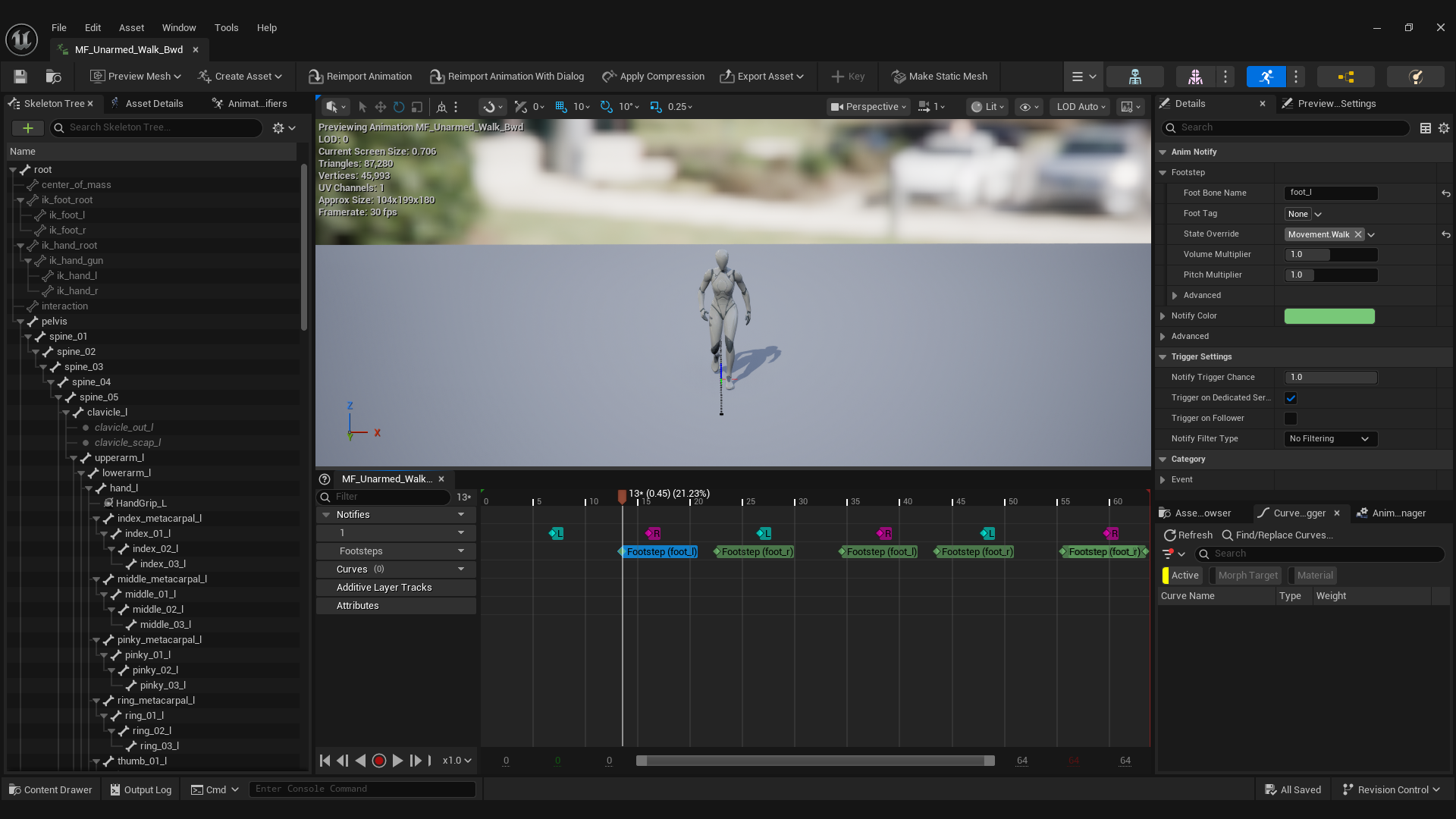
The notify labels itself with its foot on the track, like Footstep (foot_l), and is tinted green, so a busy track stays readable.
Put it on the frame where the foot goes flat and stops moving, not where the toe first touches. That is where the weight lands and where a listener expects the sound.
Notify settings
| Field | What it does |
|---|---|
| Foot Bone Name | Bone or socket to trace from. The only required field. |
| Foot Tag | Which foot this is. Optional. |
| State Override | Forces a state instead of the one the component resolves. Leave empty normally. |
| Volume Multiplier | Extra volume on top of the database. |
| Pitch Multiplier | Extra pitch on top of the database. |
| Should Fire In Editor | The engine's own setting, under Advanced. Off for Footstep notifies. There is no floor or component in an animation preview, so leave it off. |
If the bone is missing on a mesh, the footstep traces from the bottom of the character instead and still plays. The Output Log names the bone once, so a rename never makes a character silently go quiet.
Doing a whole folder at once
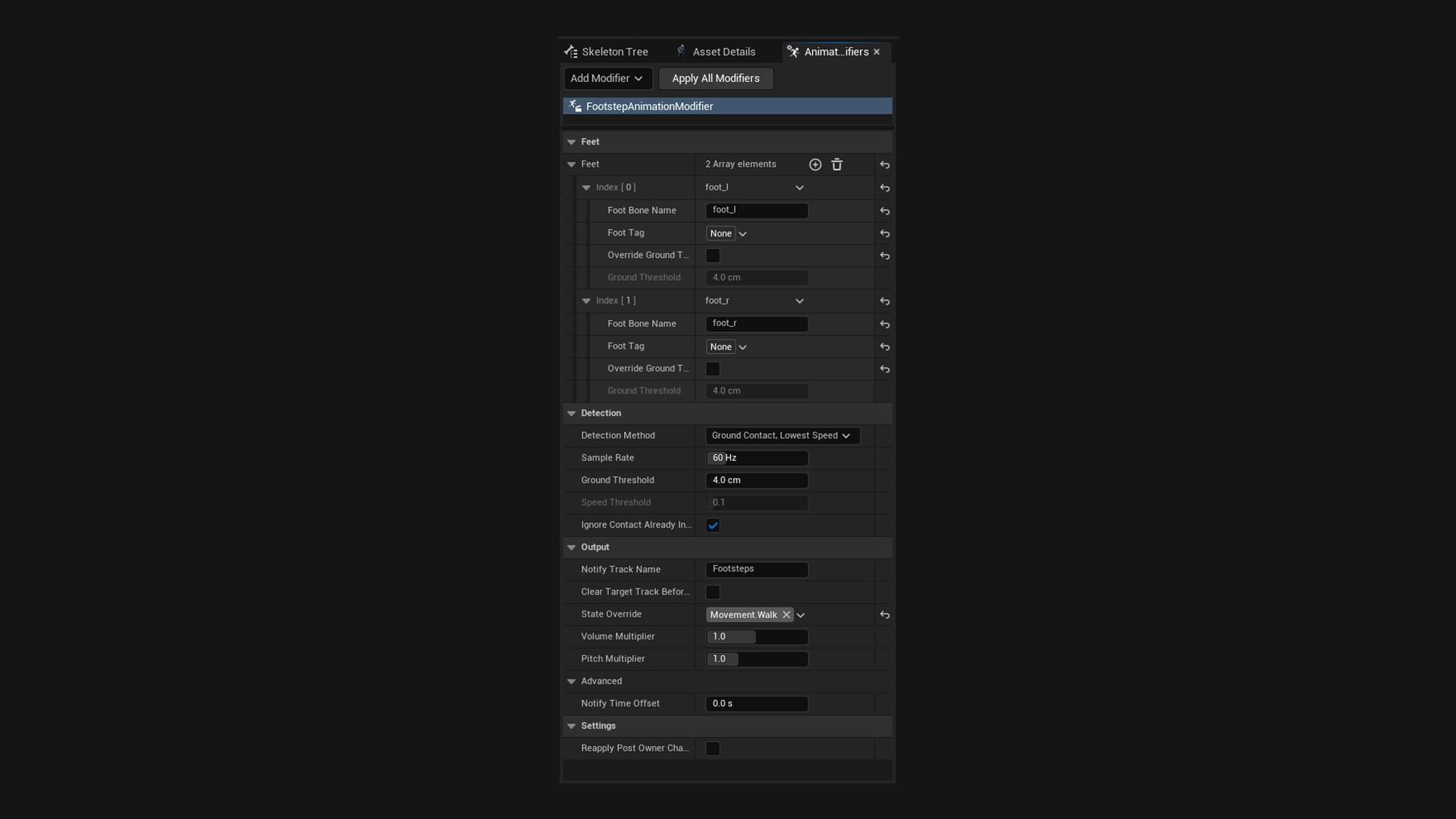
The Footstep Notify Generator samples an animation, works out where the feet land, and places the notifies for you.
- Select every locomotion animation in the Content Browser.
- Right click, then Animation > Animation Modifiers > Add Modifier > Footstep Notify Generator.
- Fill in the Feet list with your bone names.
- Right click again, then Apply Modifier.
Revert removes exactly the notifies it added, tracked by each one's unique id, so hand placed and pasted notifies are left alone even on the same track. Applying again reverts the previous run first, so it is safe to repeat.
How it finds the plants
Worth knowing, because it is what the settings below are tuning.
- It samples the animation with its root motion included and records each foot's height above the root. Measuring from the root keeps clips that climb stairs or slopes finding every step.
- The lowest point each foot ever reaches in that animation becomes its ground level, so the modifier needs no knowledge of the world the animation plays in.
- Every stretch where the foot sits within Ground Threshold of that level counts as one contact.
- The notify goes where the foot comes to rest inside that stretch, which is where the weight lands. A plant that never quite comes to rest gets its slowest moment instead.
Speed is measured against the ground, so the backwards slide of a planted foot in an in place clip is taken out, and the same settings work for in place and root motion animations.
Settings that matter
| Setting | Default | When to change it |
|---|---|---|
| Detection Method | Ground Contact, Lowest Speed | Leave it unless the results are wrong. See below. |
| Sample Rate | 60 | Raise it if quick steps are missed. |
| Ground Threshold | 4 | Raise it if steps are missed, lower it if one step becomes two. Each foot can override it, for a limp. |
| Speed Threshold | 0.1 | How slow a foot must be to count as at rest, as a fraction of its own speed range in that clip. Not used by Ground Contact Only. |
| Ignore Contact Already In Progress At Start | on | Skips a foot that starts the clip already planted. Turn it off for a loop that really lands on frame zero. |
| Notify Time Offset | 0 | A small negative value if footsteps feel late. |
| Clear Target Track Before Generating | off | Turn on to wipe a bad earlier pass. It removes hand placed notifies too. |
The three detection methods:
- Ground Contact, Lowest Speed: the default. Finds the contacts, then the moment the foot comes to rest in each.
- Ground Contact Only: fires the instant the foot reaches the ground. Slightly early, which can suit very fast or stylised plants.
- Lowest Speed Only: ignores height and fires wherever the foot slows down. For clips where the feet never share a ground level, like climbing or ladders.
If it finds nothing
Check the Output Log first. A bone name that does not exist on the skeleton is skipped with a warning naming it, and if no foot names a real bone the modifier stops with an error.
If the bones are right, raise Ground Threshold. Animations with vertical drift need more room than the default 4 units.