Setting it up
Settings
Every setting and its console variable.
Everything is under Project Settings > Plugins > Multi AO. Each setting has a console variable, so you can change it at runtime or from a scalability preset.
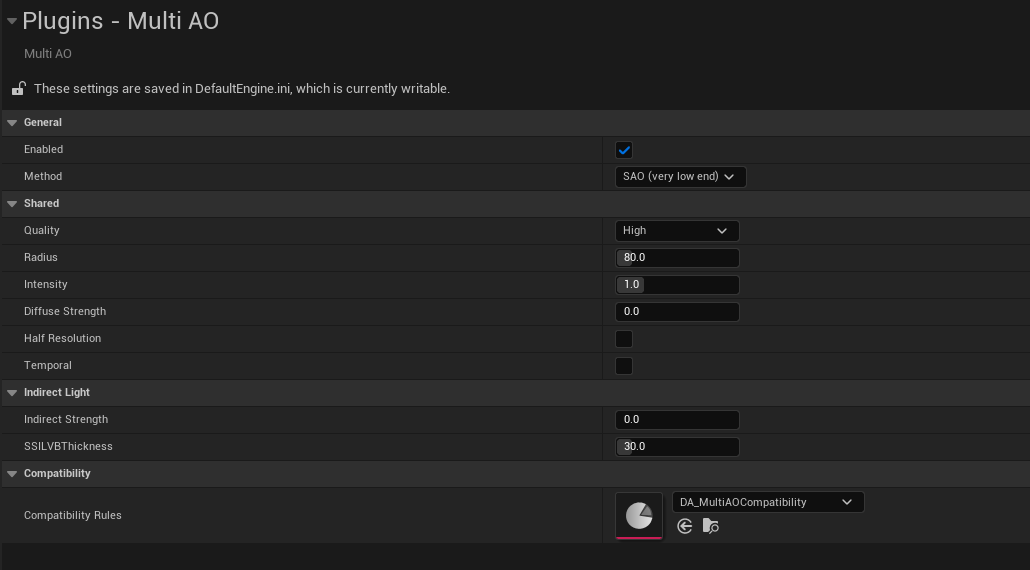
| Setting | Console variable | Default | What it does |
|---|---|---|---|
| Enabled | r.MultiAO.Enable | on | Turns the plugin on and off |
| Method | r.MultiAO.Method | SAO (3) | Which method runs, see the Method guide |
| Quality | r.MultiAO.Quality | High (2) | Low, Medium, High, Epic. More samples, less noise |
| Radius | r.MultiAO.Radius | 80 | How far occluders reach, in cm |
| Intensity | r.MultiAO.Intensity | 1 | How dark it gets. 0 leaves material AO untouched |
| Diffuse Strength | r.MultiAO.DiffuseStrength | 0 | Also darkens diffuse light, see below |
| Half Resolution | r.MultiAO.HalfRes | off | Computes AO at half resolution |
| Temporal | r.MultiAO.Temporal | off | New noise every frame for TSR to smooth |
| Indirect Strength | r.MultiAO.IndirectStrength | 0 | SSILVB and SSDO colour bounce, see Indirect light |
| SSILVB Thickness | r.MultiAO.SSILVB.Thickness | 30 | How thick SSILVB assumes each surface is, in cm |
| Compatibility Rules | DA_MultiAOCompatibility | Which rules asset to use |
Quality
There is no separate sample count setting. Quality sets the samples for whichever method is selected, so switching methods keeps the comparison fair.
| Method | Low / Medium / High / Epic |
|---|---|
| CORTAO | 4 / 8 / 12 / 16 samples |
| SSAO, SSDO | 8 / 12 / 16 / 24 samples |
| SAO | 6 / 10 / 16 / 24 samples |
| AAO | 6 / 9 / 12 / 16 samples |
| HBAO | 4 / 6 / 8 / 8 directions, 4 / 4 / 6 / 8 steps each |
| GTAO, SSILVB | 1 / 2 / 3 / 4 slices, 4 / 6 / 8 / 12 steps each |
| HDAO | 8 / 16 / 24 / 32 valleys |
| ASSAO, CACAO, MSVO | The original's own Low to Highest presets |
PBAO, Capsule AO, AO Volume and the engine switches ignore it.
Diffuse Strength
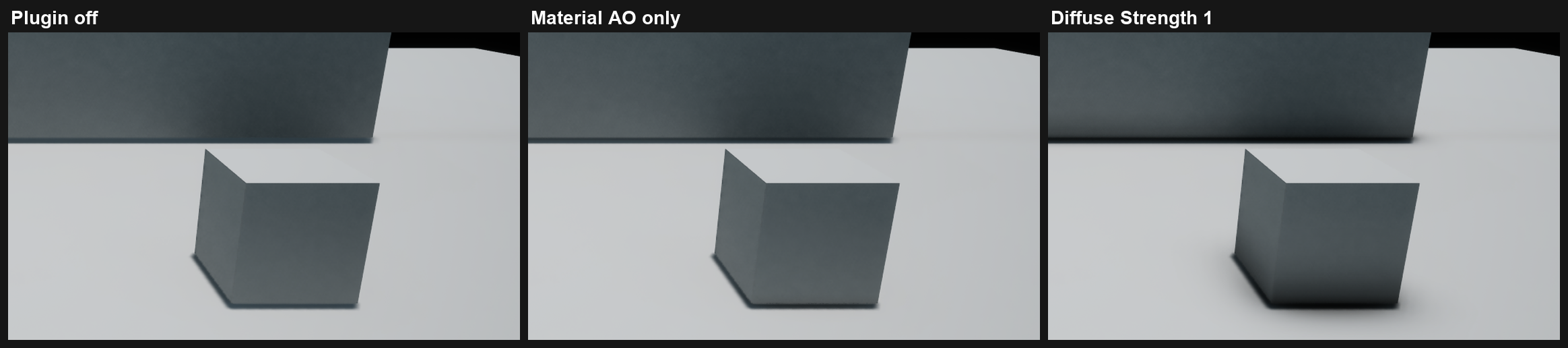
Under Screen Space GI the engine adds its diffuse light without looking at material AO, so the AO only reaches sky light and reflections and you barely see it.
Diffuse Strength also darkens the base colour by the AO. At 1 the contacts get clearly darker.
Half Resolution
Roughly halves the cost. The result is upsampled with a depth aware filter so edges stay sharp.
Temporal
Off, every pixel keeps the same noise pattern every frame. On, the pattern changes each frame and TSR averages it out, which cleans up noisy methods. CACAO, MSVO, HDAO and the analytic methods have no noise to change, so it does nothing for them.
Debug views
r.MultiAO.Debug:
1shows the computed AO in place of material AO.2left half without the plugin, right half with it.3writes the AO into base colour, so you see the raw term on lit surfaces.